Your current sponsor is slow on resubmissions, has gone silent on emails, or just raised renewal fees from RMB 1,200 to RMB 3,800/yr. Or you are migrating hosting from one mainland cloud to another and the new cloud is not in your sponsor's IDC pool. Either way, the filing has to move with you.
This article walks through the dual-sponsor transfer — the procedure that keeps the site live throughout — and the cancellation errors that put the site offline for two-to-six weeks if you do it the wrong way. Written for the operator who has a live ICP filing and needs to relocate it without losing continuity.
Why you'd transfer in the first place
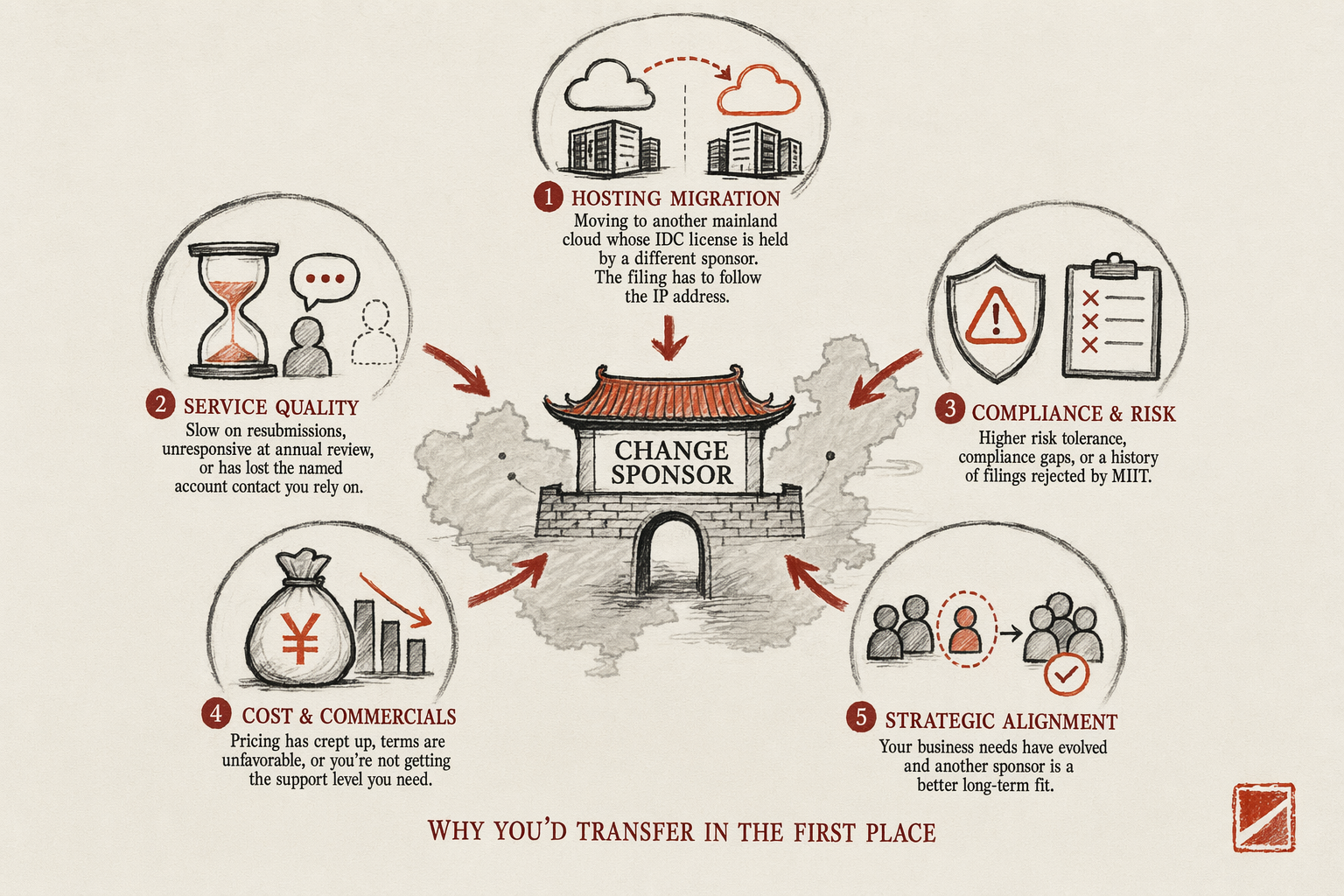
Five reasons drive most sponsor migrations:
- Hosting migration. You are moving from one mainland cloud provider to another whose IDC license is held by a different sponsor. The filing has to follow the IP address.
- Service quality. The current sponsor is slow on resubmissions, unresponsive at annual review, or has lost the named account contact you originally signed with.
- Cost. Annual maintenance fees crept above market rate and a competing sponsor offered a meaningful saving — usually RMB 1,500-3,000/yr difference across the foreign-brand book.
- Sponsor risk. The current sponsor's IDC license is up for review, has been flagged for compliance issues, or has shrunk its foreign-account book to a degree that suggests it is exiting the market.
- Province match. Your WFOE moved provinces, or your traffic profile shifted such that the current sponsor's IDC license is no longer optimally placed.
None of these is a forcing function for a same-week migration. Plan transfers during stable operating periods, not at the moment of crisis — crisis transfers are when downtime happens.
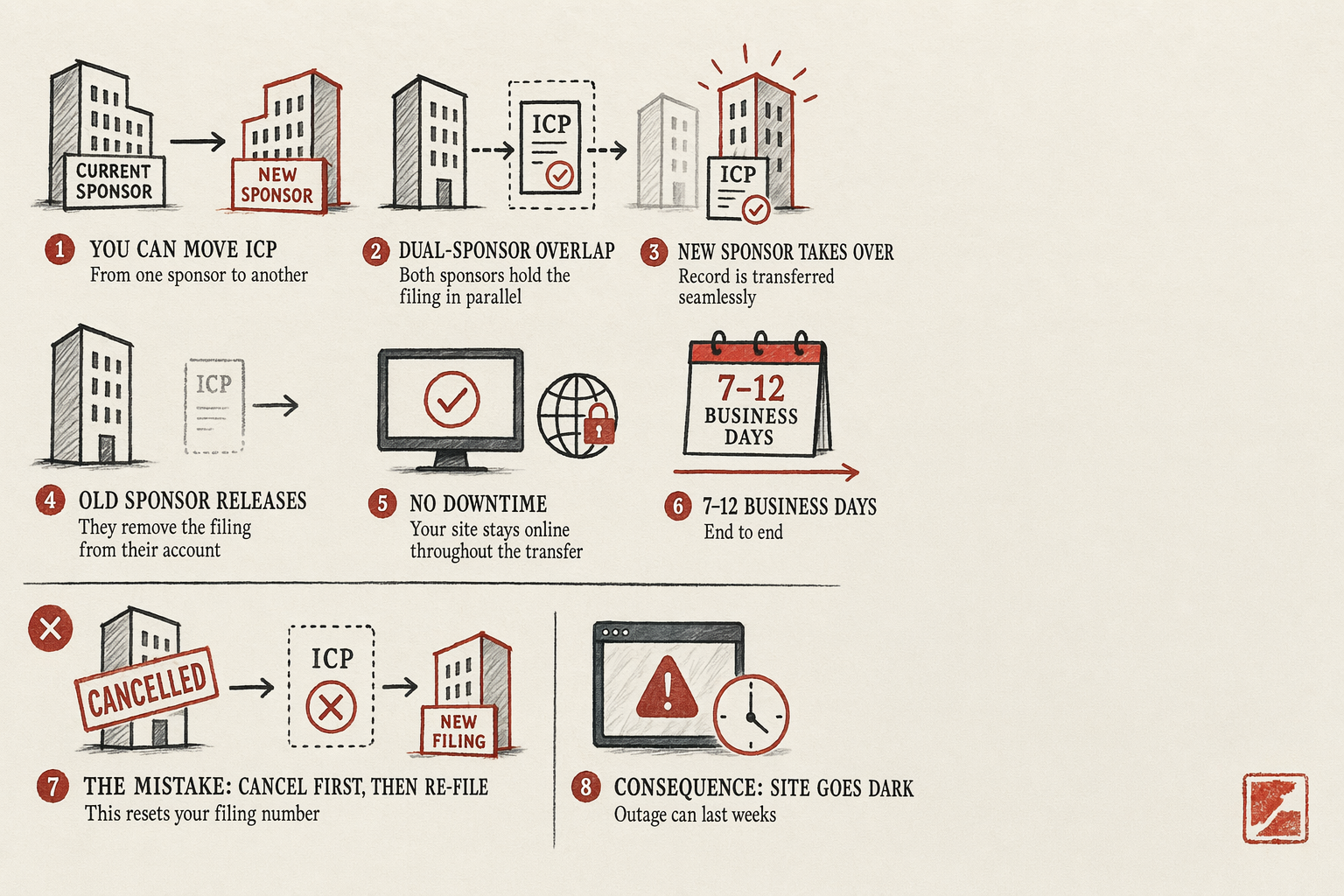
The dual-sponsor 7-12 day window
The mechanics. The MIIT (Ministry of Industry and Information Technology) portal supports a sponsor-change record where two sponsors are temporarily attached to the filing simultaneously while the receiving sponsor's IDC license is validated by the provincial Communications Administration.
Step by step:
- Day 1. Sign with the receiving sponsor. Pay the transfer-in fee (RMB 800-1,500) and provide the document packet (see next section).
- Days 2-3. Receiving sponsor files a transfer-in request through the MIIT portal referencing your existing filing record number.
- Days 4-6. Provincial Communications Administration validates the receiving sponsor's IDC license and confirms the proposed IP pool matches the requested filing.
- Day 7. You authorize the release at the current sponsor — typically through a signed release form. Current sponsor processes within 24 hours.
- Days 8-10. Receiving sponsor's IDC license becomes the active record. Old sponsor is removed from the filing. Filing number unchanged.
- Days 11-12. Carrier-level routing updates propagate. Site continues to resolve throughout.
The 7-12 day estimate assumes clean documents and a receiving sponsor with active foreign-account experience. Brand-new sponsors handling their first foreign transfer can push the timeline to 18-25 days.
Documents the receiving sponsor needs
Six documents, none of them surprising:
- Current filing record number. The XICP备XXXXXXXX号 string from your footer.
- Entity proof. Apostilled certificate of incorporation, Simplified Chinese translation, and current business license if it has been amended since the original filing.
- Legal rep ID. Passport plus the registered mainland mobile number for the verification call.
- Domain WHOIS. Current WHOIS showing the entity as registrant. If the domain has changed registrar since the original filing, include the current registrar's confirmation.
- Content sample. Screenshot of the current site to confirm the content category has not drifted from the original filing scope.
- Release authorization template. Most receiving sponsors will provide their own template for the release authorization you sign at day 7. Have the document signed and scanned in advance to compress the timeline.
Do not send the receiving sponsor your current sponsor's portal credentials. Sponsor-change is filed through the MIIT portal between the two sponsors, not by the receiving sponsor logging in to your current account.
How to keep the site live during transfer
The filing record persists throughout the transfer — what can change underneath is the hosting. If you are transferring sponsors because you are also moving hosts, sequence matters:
Option A — site stays on current host throughout transfer. Cleanest. The filing moves between sponsors while the IP address stays the same. Site resolves continuously. Migrate to the new host only after the sponsor change completes and the filing record is updated with the new IP. Adds 1-2 weeks total elapsed but eliminates downtime risk.
Option B — host migration during sponsor transfer. Faster but requires both sponsors to coordinate the IP-update record. The new IP needs to be added to the filing at the receiving sponsor's portal before traffic is cut over. Mismatched IP-to-filing routing triggers carrier-level blocks within hours.
Most operators run Option A. Option B is the move only when the current host is end-of-life or the new host materially improves performance such that the migration cannot wait.
Common cancellation errors
Error 1 — cancel at the current sponsor before signing with the receiving sponsor. Cancellation returns the filing record to inactive status; the new sponsor's transfer-in request cannot reference an inactive record; the filing has to be re-submitted from scratch. Site offline 18-30 business days.
Error 2 — let the current sponsor's annual maintenance lapse during transfer. Sponsors process release requests faster when the maintenance fee is paid up to the release date. Lapsed maintenance triggers a sponsor-side suspension that the receiving sponsor cannot transfer-in until it is cured.
Error 3 — change the domain registrar mid-transfer. WHOIS changes propagate slowly; the receiving sponsor's automated WHOIS check at validation may pull the old record and fail the match. Hold the registrar change for after the transfer completes.
Error 4 — change the legal rep mid-transfer. Same problem at the SAMR registry side. If the legal rep change is urgent, file the change at SAMR first, wait for the updated business license, then start the sponsor transfer.
Error 5 — not getting the release authorization signed by the actual legal rep. Authorized agents do not work for the release step; provincial Communications Administrations require the legal rep's personal signature with chop or equivalent verification.
For sponsor-selection criteria before you sign with the receiving sponsor, see how to choose an ICP sponsor. The broader ICP filing guide covers the filing lifecycle context, and the China digital presence service hub shows quoted prices for sponsor-transfer engagements.
Frequently asked questions
Does my filing number change after sponsor transfer?
No. The filing number stays the same — it is tied to your entity and domain, not to the sponsor. Your footer text does not need to update.
What if my current sponsor refuses to release the filing?
Escalate to the provincial Communications Administration with documentation of your transfer request, payment receipts proving maintenance is current, and the receiving sponsor's transfer-in record. Forced releases are processed within 30 business days. The escalation path is documented in the original filing engagement letter — read it before you start the transfer.
Can I transfer between sponsors in different provinces?
Yes, subject to the receiving sponsor's IDC license covering your WFOE's province or being on the pan-national license list. The receiving sponsor will confirm at the initial quote stage.
Is there a cooldown between transfers?
No formal cooldown, but back-to-back transfers in under 12 months invite extra scrutiny at the next annual review. Plan migrations with at least a 12-month gap unless circumstances force a faster move.
Next step
Before committing to the new sponsor, run their answers against the question list in how to choose an ICP sponsor. And use the ICP Readiness Checklist page 9 — the transfer document inventory — to make sure your packet is complete before day 1. Free PDF.
Related
7 min read
ICP 备案 Filing: What Foreign Brands Actually Need
Filing types, sponsor model, real-name and domain rules, top rejection reasons, renewal pitfalls — everything that goes wrong with ICP filings.
6 min read
How to Choose an ICP Sponsor for Your Domain
Picking an ICP sponsor — entity-tied filings, sponsor fee ranges, support quality, what happens when a sponsor disappears.